extraDock 4.3.14 更新内容:
更新日期:2026年9月8日
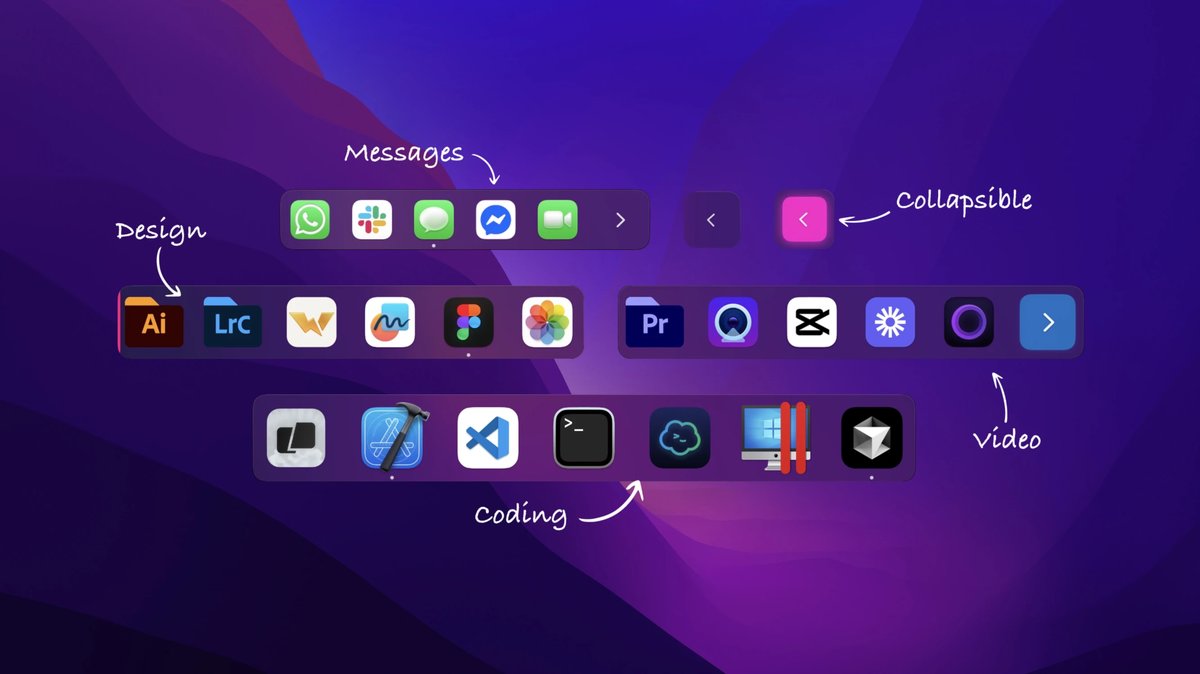
- 刘海布局模式:每个程序坞现均提供布局切换,可在程序坞与刘海之间选择。刘海模式会将程序坞渲染为贴合屏幕上、左或右边缘的纯黑刘海(在系统程序坞隐藏时也可贴合底边),并始终固定居中
- 收起为胶囊、悬停展开:静止时刘海会收成小胶囊,鼠标悬停即展开。可选择闲置模式为显示、胶囊或隐藏,并自行调整悬停延迟
- 与 MacBook 硬件刘海融合:顶部刘海会贴合屏幕物理顶部,并在带刘海的 MacBook 上与硬件刘海合并
- 新增管理器控件:程序坞管理器新增布局与刘海分区,并提供仅列出刘海可用边缘的边缘选择器。现有程序坞布局下的程序坞行为保持不变
- 菜单栏菜单始终可用:即使许可证未能配置,退出、管理器和检查更新也可从菜单栏图标进入;许可状态会显示在菜单顶部,而不再吞掉点击
- 检查更新不再返回空结果:在许可令牌不可用时,检查更新会回退到已缓存的许可证,而不再返回空更新
extraDock 4.3.2 更新内容:
更新日期:2026年7月17日
- 新增GPU使用率小组件:新的系统统计小组件加入CPU、内存和电池行列,可实时查看图形负载,以仪表环形式显示,在游戏、渲染或机器学习工作负载下从绿色升至琥珀色再至红色,支持Apple Silicon和Intel Mac
- 时钟小组件现可显示星期几(周一、周二等),可单独显示或与日期一起显示,可在时钟的自定义布局中启用,并已包含在完整预设中
- 修复折叠停靠栏在屏幕边缘附近拖动后重新打开时部分移出屏幕的问题,现在会向保持完全在显示屏内的方向展开,并锚定到放下的位置
- 修复小尺寸停靠栏图标下即使启用“显示秒数”(以及日期/时区)也被隐藏的问题,现在在任何尺寸下都会遵循设置
- 计时器小组件的持续时间、颜色、标签或文字大小更改现在会立即应用到停靠栏,无需重启
- 开启“在所有屏幕上显示停靠栏”时,ExtraDock现在会在所有显示器上预留空间,应用窗口不再滑到副屏停靠栏下方
- 改进折叠按钮的辅助功能标签,并通过清理多个已弃用的系统调用来现代化图标和文件选择器处理,以提升向前兼容性
extraDock 4.2.3 更新内容:
更新日期:2026年4月11日
- 新增文件夹堆叠小部件:从单个 Dock 图标就能浏览文件夹里的文件夹内容,可以自定义名称、色调颜色,还能选择用哪个应用打开文件夹,特别适合整理项目、下载文件或者其他文件夹集合。
- 小部件画廊现在更完善:添加小部件的界面变成真正的画廊,能提前看到每个小部件的功能,再也不用猜来猜去。
- Live Dock 更改即时生效:修改后马上就能看到效果,不需要重启或者等待。
- 自动隐藏功能变得更智能:只有光标靠近 Dock 本身时才会触发,不再是整个屏幕边缘,更精准也更好预测。
- 悬停展开功能彻底重做:现在每次悬停都运行得非常流畅,一点问题都没有。
- 设置界面全面优化:所有选项都归到正确的分类和区块里,找设置变得超级简单。
- 修复了 Dock 位置问题:指定在左/右(水平)或上/下(垂直)的 Dock 不会再错误地出现在屏幕中间。
- 垃圾桶小部件修复:清空垃圾桶的操作现在又正常工作了。
- 自动隐藏稳定性提升:切换显示器后,隐藏的 Dock 不会再卡住不出来。
- 修复了 Respect Dock Space 功能引起的卡顿问题。
- Live Dock 默认设置修正:现在默认就是全 Dock 模式,重启后也不会乱跳。
- 移除了“Repair Folders”按钮:ExtraDock 现在会自动修复文件夹显示问题,保持一切正常。
extraDock 4.1.8 更新内容:
更新日期:2026年3月14日
- 高分辨率应用图标:Dock图标现在以128pt逻辑大小渲染而非32pt,在Retina显示器上呈现清晰锐利的图标,同时修复macOS Tahoe中图标出现在方形容器内填充的问题。
- 隐形Dock模式:背景不透明度设为0时实现真正隐形的Dock,无残留边框、渐变、阴影或轮廓,图标干净浮动在桌面上。
- 系统设置徽章:检测待处理的macOS软件更新并在系统设置图标上显示红色徽章点,与原生Dock行为一致。
- 应用启动弹跳动画:从Dock启动应用时触发macOS风格的弹跳动画,提供视觉反馈。
- URL小部件重复按钮:快速复制URL小部件以重用样式,复制颜色和图标设置但清除URL并打开配置表。
- 货架小部件:完成货架小部件,支持拖放、浮动面板和精炼视觉改进。
- 上下文菜单清理:移除应用名称,重新排序为打开→在Finder中显示→隐藏→退出,与macOS Dock一致。
- 折叠按钮支持3字符:文本/表情折叠按钮支持最多3个字符并自动调整大小。
- 强调色选择器始终可见:即使折叠模式为无,颜色选择器也可见以影响Dock边缘色调。
- 效果与折叠部分默认展开:设置部分默认展开以便立即查看选项。
- URL小部件标识:在管理列表中显示域名而非实用小部件。
- 通知徽章文本:使用中等粗细而非粗体以获得更精炼外观。
- 改进拖放:浮动窗口拖放带有虚线视觉指示。
- 通知徽章多显示器崩溃修复:修复Accessibility API读取多显示器窗口位置时的崩溃。
- 通知徽章死锁修复:使用线程安全锁防止应用冻结。
- 实时Dock通知徽章:徽章在实时Dock和空间感知小部件上独立工作。
extraDock 4.1.7 更新内容:
更新日期:2026年3月10日
- 高级 Dock 自定义:通过新的不透明度、模糊和背景颜色选项控制 Dock 的外观。创建完美融入壁纸或突出的 Dock。
- 性能提升:优化了底层的一切。ExtraDock 现在使用更少的 CPU 和内存,确保即使运行多个 Dock 时 Mac 仍然敏捷。
- 错误修复:修复了添加文件夹或重新排列项目时偶尔崩溃的错误。您的 Dock 现在比以往更稳定。
extraDock 4.1.6 更新内容:
更新日期:2026年2月20日
- 优化性能,确保低CPU和内存使用
- 改进拖拽添加应用和文件夹的功能,便捷快速
- 提升系统兼容性,支持macOS 12及以上版本
- 修复部分已知问题,提高稳定性
extraDock 4.1.2 更新内容:
更新日期:2026年1月26日
- Rock-Solid Multi-Monitor Support: Refactored dock position handling to ensure docks stay exactly where placed, preventing unexpected shifts across displays when reopening the app.
- Smarter Screen Recognition: New screen resolution strategy with improved fallback mechanisms for reliable dock positioning during monitor configuration changes.
- Post-Launch Position Validation: Introduced DockPositionValidationService to validate and correct dock positions after app launch, ensuring accurate restoration of user preferences.
- Seamless Dock Appearance: Docks now wait for position validation to complete before appearing, eliminating visual jumps during app launch.
- Fixed Screen Switching Issue: Interacting with the dock in fullscreen apps no longer causes unexpected space or screen switches; current workspace remains intact.
- Edge-Sensitive Reveal: Auto-hidden docks now respond when the mouse approaches screen edges, improving intuitiveness for left or right positioned docks.
- Smoother Animations: Configurable show/hide animation durations for smoother transitions.
- Improved Mouse Tracking: Added backup polling mechanism to ensure consistent mouse tracking even when the dock is hidden.
- Live Configuration Updates: Widget settings apply immediately without requiring multiple selections or reopening the configuration panel.
- Better LiveDock Widget Sizing: Automatically recalculates dock size when visible items change, with proper positioning adjustments.
- Enhanced Collapse/Expand Settings: Improved settings experience for better user interaction.
- Better State Persistence: Enhanced dock state persistence and restoration logic for more reliable behavior.
extraDock 4.1.0 更新内容:
更新日期:2026年1月15日
- 高级Dock自定义:使用新的不透明度、模糊和背景颜色选项控制Dock的外观。创建完美匹配您的风格和工作流程的Dock。
- 复制粘贴Dock设置:使用我们的新复制粘贴功能轻松地将相同设置应用于所有Dock。不再需要手动配置每个Dock!
- 手动可折叠方向控制:我们删除了有问题的自动方向功能,并为您提供了Dock折叠和展开方式的完全控制。设置最适合您的设置的方向。
- 改进的全屏行为:在所有应用程序的全屏模式下更一致和可靠的Dock行为。
- 修复应用重排序错误:解决了Dock中重新排序应用程序的问题,确保顺畅可靠的应用程序管理。
extraDock 4.0.0 更新内容:
更新日期:2025年11月18日
- 引入Dock Widgets,支持添加时钟、日历、IP地址、天气等实时工具。
- 实现与DockFlow完全集成,可导入设置作为小部件,提升兼容性。
- 全新界面设计,优化性能并修复多项bug,提高整体稳定性。








全部评论0